

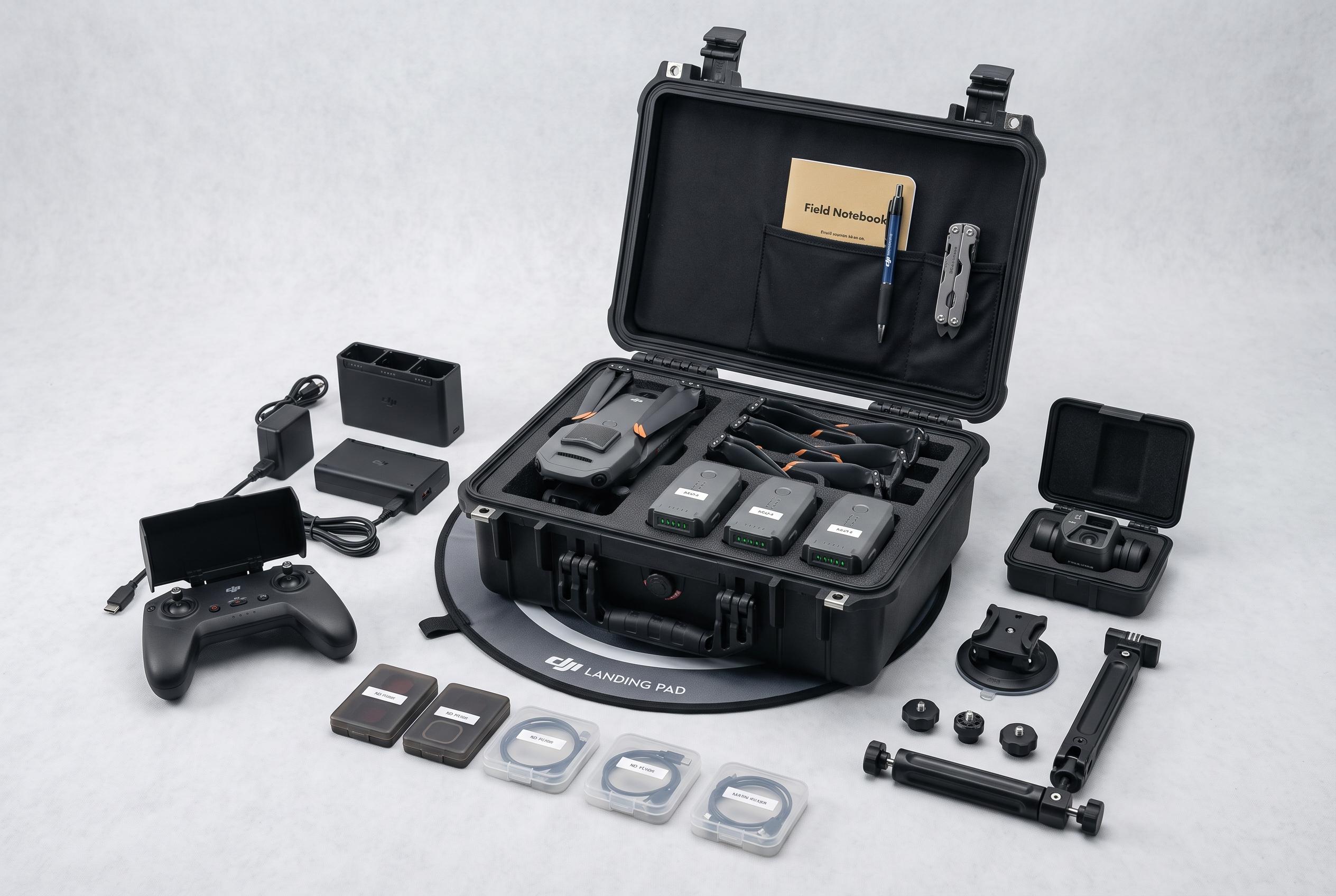

A strategic approach to drone accessories prioritises mission-specific gear such as spare batteries, protective cases, and compatible components, moving away from lengthy shopping lists and towards operational efficiency.
Most drone accessory bundles are designed in the wrong order. They begin with a long shopping list and only later ask whether each item actually prevents a problem in flight. A more sensible approach is to build around the mission: protect the aircraft, preserve footage, maintain compliance and keep the kit easy to carry and charge.
For most camera-drone owners, the priorities are plain. Exact-fit spare propellers, enough batteries for a full session, the right charging setup, a fitted case, and an approved memory card solve the most common failure points. ND filters, landing pads, anti-collision lights and propeller guards matter too, but only when the job demands them. As the guide notes, the best field kit is compact, model-specific and matched to the flights you actually make.
Battery planning is the first real decision. One spare pack is useful, two is better and three is often the practical point at which a recreational camera-drone kit starts to feel complete. Beyond that, charging speed and temperature management matter as much as raw battery count. Compatibility is also narrow. DJI’s current systems keep battery families separate, while DJI’s own charging hubs are built around specific models. According to the company, the Air 3 Series hub works with Air 3S and Air 3, while other hubs are designed only for their matching aircraft and batteries. The DJI Matrice 4 Series 200W Charging Hub, for example, charges three batteries sequentially and offers standard and ready-to-fly modes, but it is limited to Matrice 4 batteries.
Charging hardware deserves as much attention as the batteries themselves. A hub is not the same thing as a power source. The hub’s speed depends on the adapter, cable, charging protocol and battery state, and some systems require a high-output charger before they can perform at full pace. DJI support also says certain hubs can work as power banks for phones and tablets, adding some usefulness in the field. Independent guidance on drone charging reinforces the same basic point: use approved chargers, charge fully before flying and avoid treating a generic USB-C brick as a guaranteed replacement for the correct adapter.
Transport matters next. A fitted case should protect the gimbal, controller, props and batteries without letting them knock together. For vehicle transport and rougher sites, a hard case is often the safest option. For longer walks, a padded bag may be more practical. The key is exact fit: controller layout, battery count and charger shape all need to match the foam or dividers. A case that simply says it fits a drone family can still be wrong for the actual controller and battery setup.
Spare propellers are cheap insurance and should always be bought by exact model. The same applies to the small driver or tool needed to install them. Memory cards are just as easy to get wrong. DJI and SanDisk both point buyers towards cards that meet the aircraft’s write-speed requirements, and SanDisk says the V30 rating means a sustained 30 MB/s video write class. The important detail is that the aircraft manual remains the final authority on what is supported. A good card reader and a simple storage routine are part of the same workflow.
More specialised accessories should be bought only for a defined use. ND filters help video shooters manage shutter speed in bright light, but they are not a general upgrade for stills. Landing pads are valuable on dust, grass, gravel, snow and other uneven surfaces, but they become dead weight on clean pavement. Propeller guards are useful for indoor practice and close-quarters flying when the aircraft is designed for them, though they add drag and weight. Anti-collision lights are only a compliance item when the operation requires them, and they need documented visibility rather than decorative brightness.
Remote ID modules sit in the same category: necessary for some legacy or home-built aircraft, irrelevant for drones with built-in Standard Remote ID. The FAA says operators must use an accepted compliance path and register modules correctly. That makes the device a regulatory component, not a casual add-on. For that reason, buyers should verify exact compatibility before spending money on any module marketed in vague terms.
The same compatibility rule governs FPV and enterprise gear, where accessories are often core system parts rather than extras. Radios, goggles, batteries, chargers, antennas and receivers all need to match by protocol, frequency and firmware. Enterprise buyers, meanwhile, need to think in terms of uptime: battery rotation, charger throughput, spares, rugged transport, payload configuration and compliance equipment. In both cases, the best accessory is the one that solves a specific operational problem and fits the aircraft without compromise.
Disclaimer: This content is intended for informational purposes only. Readers are advised to exercise their own judgement, conduct due diligence, or consult a qualified expert before acting on any information provided.



