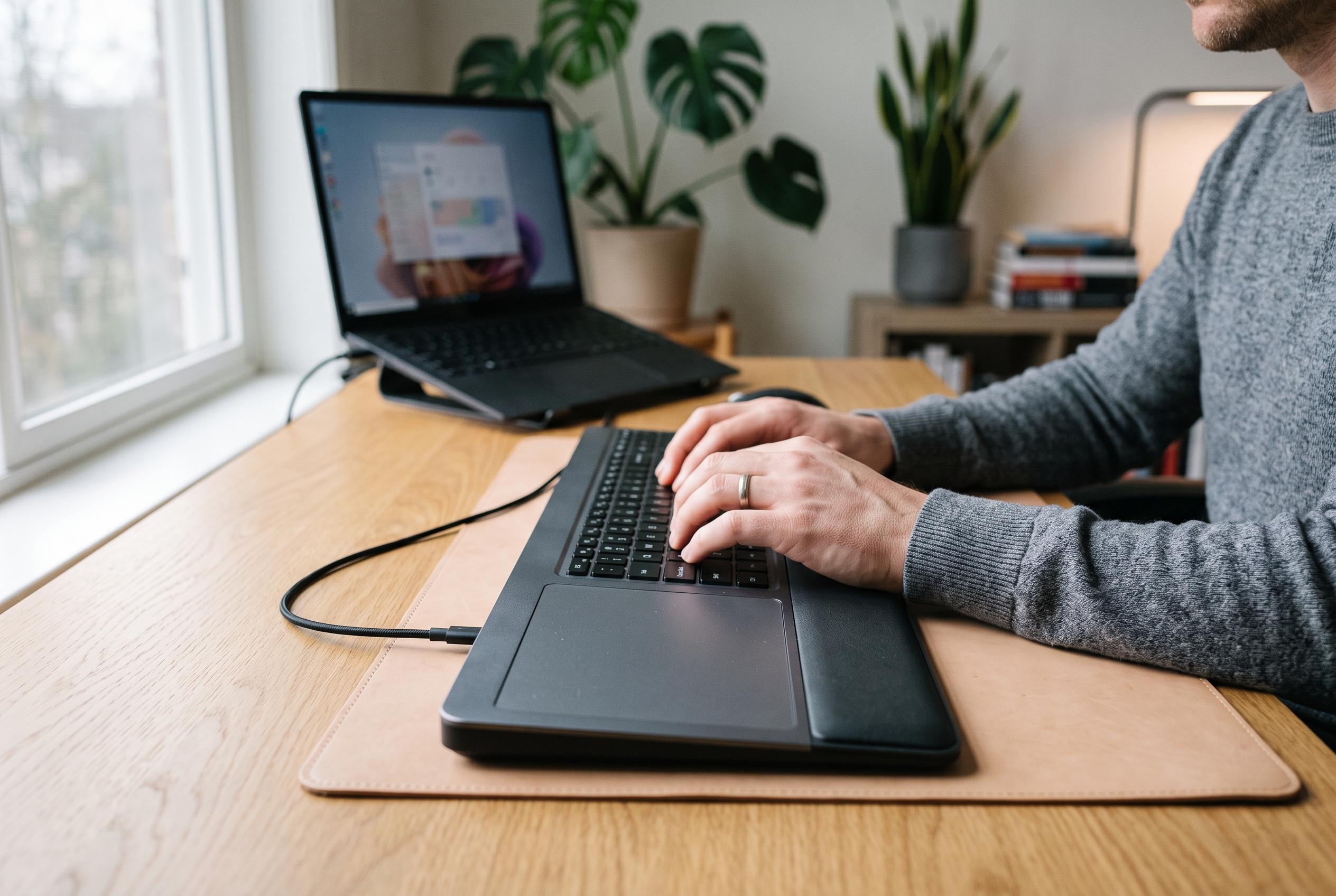

Contour Design launches the Contour Touch, a centred, desk-mounted touchpad designed to improve ergonomics and enhance productivity for Windows users working long hours at their desks.
Contour Design has tried to fill a narrow but genuine gap in the Windows market with the Contour Touch, a standalone touchpad that places its glass surface directly in front of the keyboard rather than off to the side. The company says the aim is to reduce shoulder movement and make pointer control feel more natural for desk work, and the device’s layout is built around that premise: a central touch area, four programmable shortcut buttons and an integrated wrist rest that spans much of its width. Contour pitches it as a productivity tool for people who spend long periods in front of a PC, especially those who want laptop-style gestures on a fixed workstation.
That design makes immediate sense, but it also demands real estate. The Touch is closer to the width of a full keyboard than to a conventional mouse pad, which means it is easiest to accommodate on a deep desk rather than a compact table or pull-out tray. Contour’s own setup guidance recommends aligning the pad with the centre of the keyboard and monitor, which underlines how much the product is intended for a permanent, carefully arranged workstation. The wireless model adds Bluetooth 5.1 and USB-C charging, but it is still a desk-bound peripheral rather than something to throw in a laptop bag.
In use, the touchpad’s strongest quality is its responsiveness. Windows recognises it as a touchpad without extra software, and the device supports standard multi-finger gestures for scrolling, zooming, app switching and virtual desktops. Contour’s help materials say its software is mainly for customising the four buttons, checking battery status and updating firmware, while pointer speed and gesture settings remain in Windows. That split is sensible, even if it means configuration lives in two places.
The programmable buttons are a useful addition, though not the main reason to buy the device. By default, they cover Copy, Paste, Back and Forward, but Contour says they can be reassigned, disabled or turned into macros. That makes the Touch more adaptable for writers, editors and office workers than a basic touchpad would be. In practical terms, though, the centrepiece remains the pad itself: the combination of smooth tracking, direct gesture control and a position that keeps the pointer close to the typing area.
Contour clearly wants the Touch to be seen as an ergonomic product as much as an input device. The company says the central placement is meant to reduce strain from repeated sideways reaching, and its cushioned wrist rest is designed to support extended use. That may well suit users who spend long sessions editing documents or browsing between tasks. But ergonomics is highly personal, and a larger footprint is the trade-off. For some users, especially those with smaller desks, the extra bulk will matter more than the theoretical posture benefits.
The feature set is rounded out by support for one-device Bluetooth pairing, a claim of up to 20 days of battery life and compatibility with Windows 10 and Windows 11. Contour also sells a wired version at a lower price, which may be the more sensible option for a fixed office setup. The company’s own materials position the product clearly for Windows users, not Mac owners, and that distinction is important because Apple’s Magic Trackpad remains the better-integrated choice for macOS. Contour’s approach is more specialised: a centred, office-oriented touchpad for people who want gestures without giving up desktop ergonomics.
That specialisation is also what makes the Contour Touch interesting. There are cheaper mice, smaller touchpads and more portable devices that will suit many people better. But for users who prefer touchpad-style navigation and want it anchored beneath the keyboard, Contour has produced one of the few polished options in a market that has long been thin. The result is not universal, and it will not fit every desk or workflow. Yet within its narrow brief, it is a well-considered peripheral with a clear purpose and enough refinement to justify attention from Windows users who have room for it.
Disclaimer: This content is intended for informational purposes only. Readers are advised to exercise their own judgement, conduct due diligence, or consult a qualified expert before acting on any information provided.